11/06/2026
Introduction
Starting an IT career can feel challenging when you have little professional experience or are unsure which technical skills to learn first. The technology industry offers many career opportunities, but choosing the right starting point is important.
You do not necessarily need an advanced degree or years of programming experience to enter the IT industry. Depending on your interests and background, you could begin with IT support, software development, cybersecurity, cloud computing, data analysis or quality assurance.
The key is to choose a career path, develop relevant skills and demonstrate your abilities through practical projects.
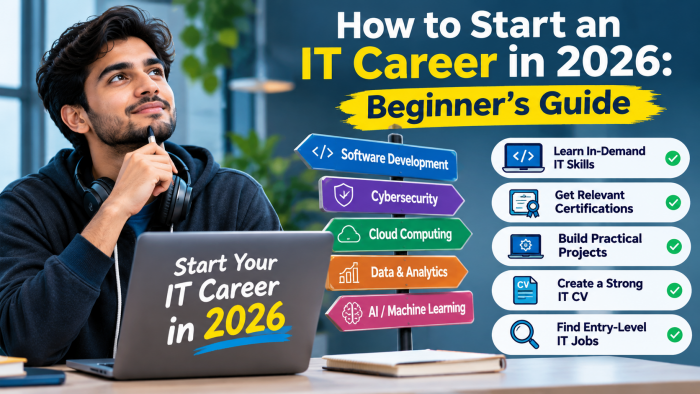
In this guide, we explain how to start an IT career in 2026, which entry-level technology jobs to consider, what skills employers look for and how to find opportunities.
1. Understand the Different IT Career Paths
Before investing time in courses or certifications, explore the different areas of information technology. Each career path requires a different combination of technical knowledge and practical experience.
Here are six popular IT career paths to consider.
IT Support and Help Desk
IT support is a practical starting point for people who enjoy troubleshooting technical problems and helping others.
Typical responsibilities include:
-
Troubleshooting computers, software and network problems.
-
Installing and configuring operating systems.
-
Managing user accounts and permissions.
-
Supporting employees with technical issues.
-
Maintaining IT documentation and support tickets.
Skills to learn: Windows, Linux basics, networking, Microsoft 365, hardware troubleshooting and customer support.
Software Development
Software developers build websites, applications, business systems and digital products.
Common responsibilities include:
-
Writing and maintaining application code.
-
Developing websites and software features.
-
Working with databases and APIs.
-
Testing and fixing software issues.
-
Collaborating with designers and other developers.
Skills to learn: Python, JavaScript, Java, HTML, CSS, SQL, Git and software development fundamentals.
Read our guide to Software Developer Jobs: Skills, Portfolio and Interviews to understand the skills and projects that can help you prepare.
Cybersecurity
Cybersecurity professionals help organisations protect their systems, networks, applications and information from security threats.
Typical responsibilities include:
-
Monitoring security alerts.
-
Investigating suspicious activity.
-
Identifying vulnerabilities.
-
Managing access controls.
-
Supporting incident response activities.
Skills to learn: Networking, Linux, security fundamentals, SIEM tools, identity management and basic scripting.
Explore our guide to Cybersecurity Jobs in the USA for beginner and professional career options.
Cloud Computing
Cloud professionals build, manage and secure infrastructure hosted on platforms such as Amazon Web Services, Microsoft Azure and Google Cloud.
Common responsibilities include:
-
Managing cloud infrastructure.
-
Configuring virtual machines and storage.
-
Monitoring cloud applications.
-
Managing identity and access.
-
Automating infrastructure deployments.
Skills to learn: Linux, networking, AWS, Azure, Google Cloud, Terraform and basic scripting.
Read our detailed guide to Cloud Computing Jobs in the USA to explore cloud roles and career opportunities.
Data Analytics and Data Engineering
Data professionals help organisations collect, organise, analyse and use information to make business decisions.
Typical responsibilities include:
-
Collecting and cleaning data.
-
Creating reports and dashboards.
-
Writing SQL queries.
-
Building data pipelines.
-
Identifying patterns and trends.
Skills to learn: Excel, SQL, Python, Power BI, data visualisation and database fundamentals.
Quality Assurance and Software Testing
QA professionals test applications to identify bugs and ensure software works as expected.
Typical responsibilities include:
-
Testing websites and applications.
-
Preparing test cases.
-
Reporting software defects.
-
Performing regression testing.
-
Working with developers to resolve issues.
Skills to learn: Manual testing, test documentation, browser developer tools, API testing and basic automation.
2. Learn the Essential IT Skills Employers Expect
You do not need to master every technology before applying for your first job. Start with the fundamentals and gradually develop specialist knowledge.
| Skill |
Why It Matters |
| Computer fundamentals |
Helps you understand hardware, software and operating systems. |
| Networking |
Important for support, cloud and cybersecurity roles. |
| Linux and Windows |
Common operating systems in business environments. |
| Programming |
Useful for software development and automation. |
| SQL and databases |
Helps manage and analyse information. |
| Cloud computing |
Supports modern applications and infrastructure. |
| Cybersecurity basics |
Helps protect systems and sensitive information. |
| Communication |
Essential for working with users and technical teams. |
| Problem-solving |
Helps diagnose and resolve technical issues. |
For a more detailed overview, read our article on Top IT Skills Employers Want in 2026.
3. Choose One Programming Language or Technical Specialisation
One common mistake beginners make is trying to learn too many technologies simultaneously.
Instead, select a technology based on your preferred career path.
| Career Goal |
Recommended Starting Skills |
| Software Developer |
Python or JavaScript |
| Frontend Developer |
HTML, CSS and JavaScript |
| Backend Developer |
Python, Java, PHP or Node.js |
| Data Analyst |
SQL, Excel and Power BI |
| Cybersecurity Analyst |
Networking, Linux and security fundamentals |
| Cloud Engineer |
Linux, networking and AWS or Azure |
| IT Support Specialist |
Windows, hardware and networking |
| QA Tester |
Manual testing and test case preparation |
If you are interested in cloud infrastructure, compare AWS, Azure and Google Cloud before choosing your first cloud platform.
4. Build Practical Projects to Demonstrate Your Skills
Learning through courses is useful, but employers also want to understand what you can actually do.
Build two or three projects related to your target role.
Here are some beginner-friendly examples:
Software Development Projects
-
Personal portfolio website.
-
Task management application.
-
Simple e-commerce website.
-
Database-driven booking application.
Cybersecurity Projects
-
Basic home security lab.
-
Sample security log investigation.
-
Vulnerability assessment in an authorised test environment.
-
Security awareness checklist.
Cloud Computing Projects
-
Deploy a basic website on AWS or Azure.
-
Create a virtual machine and configure access.
-
Build a simple automated deployment workflow.
-
Configure monitoring and backup for a sample application.
Data Analytics Projects
-
Sales performance dashboard.
-
Customer data analysis.
-
Excel reporting automation.
-
SQL-based business reporting project.
Upload suitable projects to GitHub or create a portfolio website. Include screenshots, technologies used, project objectives and a clear explanation of your contribution.
Practical evidence can help employers understand your abilities even when you have limited professional experience.
5. Do You Need an IT Degree or Certification?
A university degree can be useful, particularly for employers that require formal qualifications. However, not every entry-level IT position requires a computer science degree.
Depending on the role, employers may consider practical skills, relevant experience, certifications and project work.
Some certifications worth exploring include:
| Career Path |
Certification to Consider |
| IT Support |
CompTIA A+ |
| Networking |
CompTIA Network+ |
| Cybersecurity |
CompTIA Security+ |
| AWS Cloud |
AWS Certified Cloud Practitioner |
| Microsoft Cloud |
Microsoft Certified: Azure Fundamentals |
| Data Analytics |
Microsoft Power BI Data Analyst Associate |
Check the current certification requirements and exam details before enrolling.
Remember that certifications are most valuable when combined with practical experience. Avoid collecting certificates without developing the skills needed for your chosen role.
6. Prepare a Professional IT Resume
Your resume should clearly demonstrate your technical knowledge, projects and relevant experience.
If you are a beginner, focus on transferable skills and practical achievements rather than trying to make your experience look more advanced than it is.
A good entry-level IT resume should include:
-
Professional summary.
-
Technical skills.
-
Education and relevant training.
-
Certifications.
-
Personal or academic projects.
-
Internship or work experience.
-
GitHub and portfolio links, where relevant.
For example, instead of writing:
"Knowledge of Python and SQL."
Write:
"Developed a Python-based data processing project and used SQL queries to organise and analyse sample business records."
Use accurate descriptions and include measurable results when you have them.
7. Apply for Entry-Level IT Jobs
Once you have learned the fundamentals and prepared your resume, start applying for positions that match your current abilities.
Some entry-level IT job titles include:
-
IT Support Technician.
-
Help Desk Analyst.
-
Junior Software Developer.
-
Junior Web Developer.
-
QA Tester.
-
Junior Data Analyst.
-
SOC Analyst Trainee.
-
Cloud Support Associate.
-
Technical Support Engineer.
-
Junior Systems Administrator.
Do not restrict your search to jobs with the word "junior" in the title. Some employers advertise trainee, associate, graduate and entry-level positions.
You can explore technology opportunities through the IT Job Board.
Use relevant job titles, technologies and locations when searching. For example, try searches such as "Junior Python Developer", "Entry-Level IT Support" or "Graduate Cloud Engineer".
8. How to Gain IT Experience Without a Full-Time Job
Getting your first IT job can be difficult when employers ask for previous experience. However, you can build relevant experience through other activities.
Consider these options:
Internships: Apply for internships and graduate programmes that provide practical workplace experience.
Freelance projects: Build websites, automate simple tasks or help small businesses with technical requirements.
Open-source contributions: Contribute to public projects and learn how professional development teams collaborate.
Home labs: Create test environments to practise networking, Linux, cloud infrastructure and cybersecurity.
Personal projects: Develop applications and document your work so employers can review your practical abilities.
Always describe personal projects and professional employment accurately on your resume.
9. Create a 90-Day IT Career Development Plan
A structured plan can help you move from learning to applying for jobs.
| Period |
What to Focus On |
Expected Outcome |
| Days 1–15 |
Research IT roles and choose one career path. |
Clear career direction |
| Days 16–30 |
Learn the technical fundamentals. |
Basic technical knowledge |
| Days 31–45 |
Study relevant tools and technologies. |
Practical tool familiarity |
| Days 46–60 |
Complete one or two projects. |
Portfolio evidence |
| Days 61–75 |
Prepare your resume and GitHub profile. |
Job application materials |
| Days 76–90 |
Apply for relevant jobs and practise interviews. |
Active job search |
You can adjust this schedule depending on your existing knowledge, available study time and target role.
10. How to Find IT Jobs More Effectively
A successful job search requires more than sending applications to hundreds of employers.
Use a focused approach:
-
Select two or three job titles that match your skills.
-
Search for relevant vacancies regularly.
-
Read job descriptions carefully and identify repeated requirements.
-
Tailor your resume for each application.
-
Apply for suitable roles as early as possible.
-
Prepare examples of your projects and problem-solving experience.
-
Track applications and follow up professionally.
A specialist technology job board can make it easier to focus on IT-related opportunities rather than unrelated vacancies.
Visit ITJobBoard.net to explore technology job opportunities and use the IT Job Board career advice blog for additional job-search and career guidance.
Frequently Asked Questions
1. Can I start an IT career without experience?
Yes. You can start by learning technical fundamentals, completing practical projects, gaining certifications and applying for entry-level roles such as IT support technician, junior developer or QA tester.
2. Which IT job is easiest to get for beginners?
IT support, help desk, technical support and some junior QA positions can be accessible starting points. However, requirements vary by employer, location and candidate background.
3. Do I need coding skills to work in IT?
No. Not every IT career requires programming. IT support, networking, systems administration and some cybersecurity roles can focus more on troubleshooting, infrastructure and technical operations. Basic scripting is still useful in many positions.
4. How long does it take to learn IT skills and get a job?
It depends on your starting knowledge, chosen career path and study schedule. Some candidates become ready to apply for entry-level positions within several months, while more specialised roles may require longer preparation and practical experience.
5. Which IT field has good career growth?
Software development, cybersecurity, cloud computing, data engineering and AI-related engineering offer several potential career paths. Your best choice depends on your interests, abilities and the skills employers seek.
6. Can I switch to an IT career from a non-technical background?
Yes. Many people transition into technology from other industries. Start with transferable skills, choose a suitable entry-level path and build practical experience through projects, training or internships.
7. How can I find entry-level IT jobs?
Search specialist IT job boards, company career websites and graduate recruitment programmes. Use role-specific keywords, location filters and relevant experience levels to identify suitable vacancies.
Final Thoughts
Starting an IT career in 2026 does not require learning every programming language or becoming an expert in every technology. It requires a clear direction, consistent learning and practical evidence of your abilities.
Choose one career path, build the essential skills, complete relevant projects and prepare a professional resume. Then start applying for positions that match your current experience while continuing to learn.
Whether you want to become a software developer, cybersecurity analyst, cloud engineer, data professional or IT support specialist, taking consistent steps can help you move towards your first technology role.
Related Blogs
-
-
-
-
-
-
-
-
-
-
-
-
-
-
-
-
-
-
-
-
-
-
-
-
-
-
-
-
-
-
-
-
Cybersecurity Jobs in the USA: Best Roles for Beginners and Professionals
-
-
-
-
-
-
-